A big one. Breeders get health records, points totals, and placings that say how many were in the class. Every show printout now comes as a PDF, so it prints the same from any browser. There are printable comment cards, an email list of everyone who's entered your shows, show cards that fill themselves in, Wool/Fur in just some shows, and a fix so a sold animal stops tying the seller to the buyer.
Your herd
- Health records. Under the weight history on an animal's page, + Add a health record keeps what happened — sick, injury, treatment, vaccine, worming or vet visit — with the date, the medicine and dose, and notes. Only your herd sees them.
- Meat withdrawal: type the days and HARES shows the date it clears. The animal's page says so until then.
- Remind me on a date — a second dose, a recheck — and you get a notification that day, and it's in your weekly reminder email.
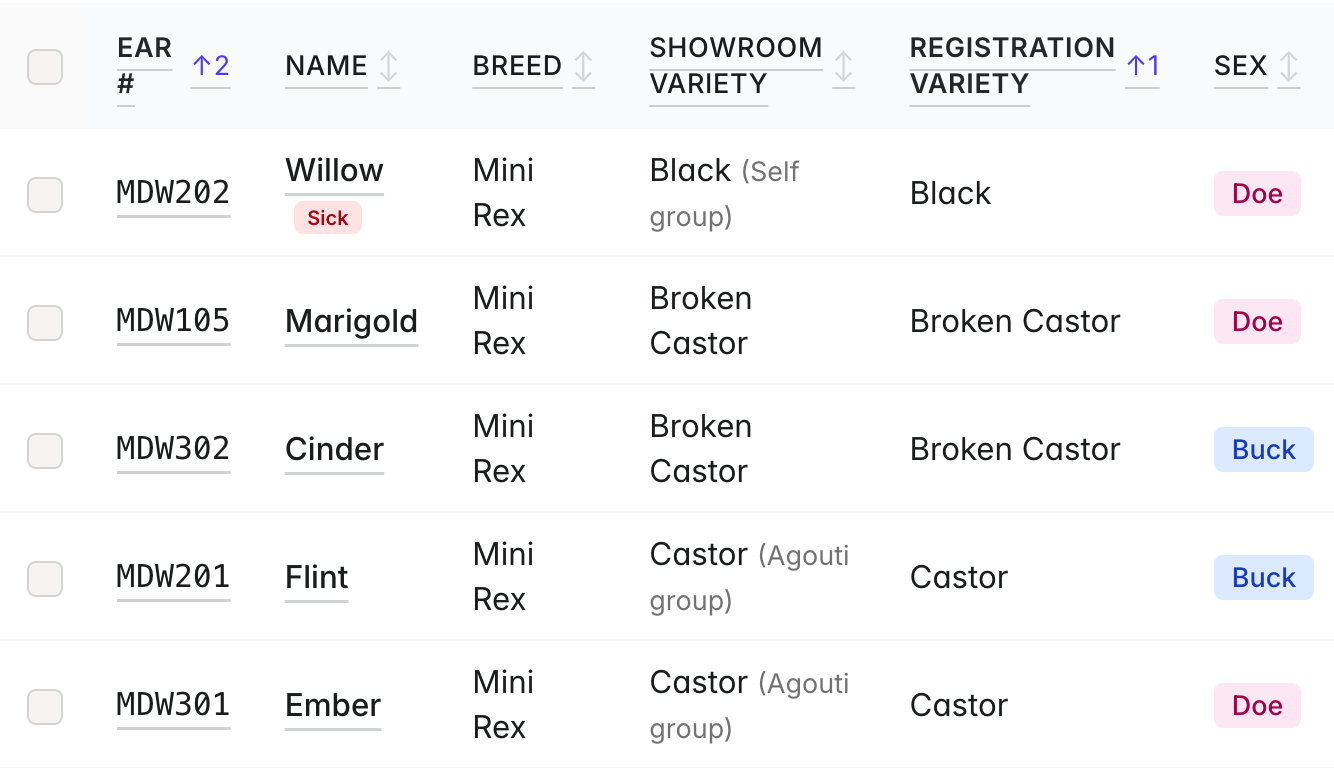
- Sick — don't show marks an animal sick on its page and on My Herd, and notes it when you go to enter it in a show, until you press Mark well again.
- Treated a group? Tick them on My Herd and press Add health record. Each animal gets its own record, and a cost is split across them.
- Price Paid on an animal's record. Income & Expenses lists it under Animals bought and counts it as an expense, and a health record's cost goes under Health & vet. An animal transferred to you through HARES comes with the price it sold for.
- Registration Variety: type it or pick it, and the Showroom Variety fills itself in. The list shows the colors you've used for that breed first, then ARBA's, with (Exhibition) colors marked. The first time you type a color HARES can't place, pick what it shows as, and HARES remembers it for your next animal of that breed and color. Type a color a letter or two off one it knows, and it asks Did you mean …?
- Charlie and Sport tick boxes under Registration Variety, for the breeds that produce them. Ticking either makes the animal Not showable, and it prints after the color on the pedigree, like "Black · Charlie".
- My Herd can open on a default breed. Set it in Settings → Display & units → My Herd opens on. The Breed filter still switches to any other.
- The wide My Herd table keeps a sideways scroll bar at the bottom of the screen, and the name stays put while you scroll across.
- Cage cards can show the last litter date — tick Last litter date in Settings → Cage cards.
- Pedigrees: a long name shrinks onto one line in every box, and a Breed on each card tick box (Settings → Pedigree branding) takes the breed off the ancestor boxes if you'd rather not repeat it. It stays on unless you untick it.
- ARBA Masters progress on Reports: Grand Champions in each breed, counted from the ARBA Grand Champion # on your animals, against Master Exhibitor (50), Grand Master Exhibitor (100) and Master Breeder (50 bred by you).
Litters
- One Record ▾ button on a litter holds Kindled, Palpated and Missed (Babies born, Palpated and Didn't take for cavies).
- Palpated: the date and Felt babies or Didn't feel any, shown on the litter. It needs a breeding date first.
- # Peanuts on rabbit litters, counted apart from born and alive, with a Peanuts column on Reports.
- # Fall offs on Mark as bred, not just Record Litters, shown beside the bred date.
- A birth with no live kits doesn't email anyone waiting. The litter archives itself, and its page asks what to do with the reservations on it: plan a new breeding and take them along, or leave them open.
- A kit saves without a color. Weigh it and fill in the rest from its Edit page, and pick the color once you can tell.
Points and wins
- Placings say how many were in the class — "2nd of 7" — on an animal's Show Wins and its Show History PDF. The count is the animals that showed; scratches and wrong-class animals don't count.
- Points totals. An animal's Show Wins card shows its Lifetime points, and Reports shows your herd's points for this year and lifetime: Sweepstakes, Fur/Wool sweepstakes, Quality Points and Herdsman. They come from the same numbers as the exhibitor show reports, plus points you type in, and count only breeds sanctioned at that show. Half points are kept. The first time, a big herd may say it's still adding up.
- Herdsman points for the clubs that run a herdsman contest, each by its own rules.
- A bought animal's own lifetime counts everything it's won. Your herd's totals count what it won after it came to you.
- Adding a win from another show: Accomplishments → Add a leg, award or points. Pick what it was (1st to 10th, or an award) and Out of how many, and there are boxes for sweepstakes, quality and herdsman points. A Points only type is for points without a win.
Entering shows
- Bring in animals you've entered before. At the top of a show's online entry form, tick animals from your earlier shows — any mix — and press Bring in. They're added to the form, and anything you've already typed stays. Check each one's class: it's what it was entered as last time.
- Save for later when entering from your herd. It keeps the form just as it is — the animals ticked, their shows, classes and fur — with your login, so you can finish on another device. Come back to that show and it asks whether to continue or start over.
- Each animal's weight shows beside it when you enter from your herd, to help pick its class.
- Wool/Fur in just some shows. An animal entered in two or more shows can go in Wool/Fur in only some of them: Wool/Fur in which show(s)? Every show starts ticked. It's on the online entry form, entering from your herd, and the secretary's + Enroll Entry and Bulk Entry.
- Forgot a fur entry? Edit the animal on My Entries and tick Also enter in its Fur class, while the show still takes new entries. It goes to the secretary like any change. Secretaries have the same box when editing an entry.
- Show cards, filled in for you. Print cage cards on My Entries opens your show cards with the show's name and date, the exhibitor, and each animal's class and coop # already in. My Submissions offers the same right after you enter from your herd. From the entry list for a show that isn't on HARES, they come for just the animals you ticked.
- The Exhibitor # box on the online entry form reads Auto: the show gives out exhibitor numbers, so two people can't pick the same one.
- Staying signed in. Signing in to the online entry form by email link now lasts two weeks, with a Sign out at the top. A link opened where someone else is signed in asks which of you to continue as.
- A Review My Entries page left open no longer dead-ends. It used to say the change was rejected and lose what you'd typed. Now the form comes back with everything you typed or, if you'd been signed out, asks you to sign in again.
Sold and transferred animals
- A sold animal stops tying the seller to the buyer. A seller who had entered a sold animal under the buyer's name could see the buyer's other shows on My Entries, and Withdraw All and Edit my info reached the buyer's own animals and details. Now the seller sees the shows they entered it in, marked Sold and read-only, and can change only their own animals.
- Shows after the sale go with the animal. A show that starts after the sale day belongs to the buyer's copy of the animal; a show already under way on the sale day stays the seller's to its end. Show-day alerts stop for the seller after the sale day. The buyer can change, withdraw or scratch any entry holding an animal sold to them.
- Sales from before today are sorted out too. If an animal you sold was shown after the sale and those shows were counting in your herd — its points, legs and show history — they now count in the new owner's herd instead. Shows from before the sale stay yours. Show results and the secretary's reports don't change.
Printouts
- Every show printout is a PDF now, so it prints the same from any browser — no more pages breaking differently in each one, or blank pages from Safari. Where a page shows the printout, it shows the PDF itself, so what you see is what prints. That's Check-in Sheets, Control Sheets and Blank Control Sheets, the Fees Sheet, Class Counts, Breed & Variety Breakdown, the Award and BIS Check Lists, Pre Show Entry Totals, the judge sheets, the QR posters, Writer Instructions, the Show-Day Alerts sheet, the Exhibitor List, Cost of Show, the judge fee sheet, Leg Check, and a breeder's Income & Expenses.
- Check-in Sheets put the Total Due at the top of page 1, beside the exhibitor, so it's never lost on a second page.
- Pre Show Entry Totals prints sideways, in groups of sub-shows, so judge names stay readable at a big show.
- Leg Check prints the view you're on, with your search and filters.
- Comment cards. Print ▾ → Comment Cards → a sub-show: a card for every animal, two per page in control-sheet order, filled in with the show, ear #, coop #, exhibitor, breed, variety and class, the judge, and No. in Class and No. Exhibitors. The judge's marks, remarks and stamp go on at the table. Print one breed or one animal (a reprint keeps its number), or blank cards. Rabbits and cavies each have their own card.
- Breed Special Sheets. Print ▾ → Breed Special Sheets → a sub-show: a sheet for each breed entered, listing its colors and groups, with Ear #, Exhibitor and Color boxes for BOV/BOSV, BOG/BOSG, BOB/BOSB and Best Sr/Int/Jr — only the awards that breed gives. There's a Blank one too.
- Print results (PDF) on each sub-show's Results tab.
- Day-of-show entries: tick Accepting day-of-show entries on the show, and the control sheets end every class with blank lines to write them in (3 unless you change it).
Running a show
- Exhibitor Email List. ✉ Email List on the Shows page gathers the email of everyone who's entered your shows, one line each, to copy into BCC or download as a PDF or a spreadsheet. Pick which shows, leave someone off, or add someone. HARES doesn't send anything.
- "To review" on the Shows page: an amber number on each show with online entries waiting.
- Fix an animal from the Results tab. The ✎ beside an ear # asks first, then opens the entry right there. If the animal is already placed, the form says which results a change would clear.
- Entry fee: Regular, Late or Day of show on Bulk Entry and + Enroll Entry, starting from the show's dates. On Bulk Entry, one pick sets the batch and any animal can differ. A paper entry that came in on time but is typed in after the late date needs switching to Regular.
- Bulk Entry shows the whole entry to check against the paper. After Enroll Entries, the exhibitor's contact details and every animal they have in the show are at the top. Click an ear # to fix one and come straight back.
- Premiums by class size. Tick Pay places by the number in the class to pay places by how many showed — rows like "3 to 5 in class", each with its 1st to 5th amounts. The form warns about a class size no row covers.
- The results activity log reads in ear numbers and exhibitors, and Hide closes it again.
- Sanctions: each breed's card minimizes, and starts minimized once all its numbers are in.
- Required Exhibitor Info. Name is always required now. A show's Require phone number and Require mailing address also apply on Bulk Entry, + Enroll Entry and Edit Exhibitor, so unticking the address no longer leaves those screens asking for one.
- Any time works in the show's date boxes. Entries close could refuse a time you picked.
- Check the whole sub-show flags a breed or color with nothing entered yet, instead of saying every breed checks out.
Show day
- Superintendent: a Show: All picker narrows the judge tables, their totals, the add-breed boxes and the "still unassigned" line to one sub-show. A sub-show with every breed assigned is grayed out but can still be picked.
- Writers see the judging order at the top of their page: each judge's breeds numbered in order, marked done, being judged or next. Tap one to open it. A breed the writer has submitted shows done, and the page is up to date whenever you come back to it.
Reports
- Points Report by show, by breed, or both. On Club Show Reports, pick how each exhibitor's points are broken out.
- Half points are kept. At clubs that pay half points, the Points Report was dropping the half from breed totals, so some exhibitors came up short. It now matches their own report, so some totals go up by a half. Whole numbers print as "101", not "101.0".
- Best Display goes by exact points, so 57.5 beats 57. That used to be a tie decided by name, so a report made again can name a different winner than an earlier copy.
- Exhibitor show reports: where a club pays only the highest of a group of awards, the lower one's Q.Pts box is blank, so the column adds up. RIS at a specialty or national reads "RIS (no leg)". And the footnote no longer says U placements don't count toward legs — they do.
Everywhere
- Text size: Small, Normal or Large, for each person — in your account menu on the website, or More → Appearance in the app. Printouts keep their size.
- Info is now Guides, in the menu and on the app's More screen. Old links still work.
- A page left open too long says so — "This page was open too long", with a Reload button — instead of going blank, or a button doing nothing.
- Menus stay on the screen on a phone instead of opening off the edge.
- Search boxes keep up on big lists.
- www.haresregistry.com goes to haresregistry.com. If you were signed in on the www address, sign in once more.
In the app
- Signed out, the Android app opens on Log in instead of the website's homepage.
- A long breed and color wrap on My Herd's cards instead of cutting the color off.
As always, thanks for using HARES. Reply to any HARES email if something looks off.